

Overview
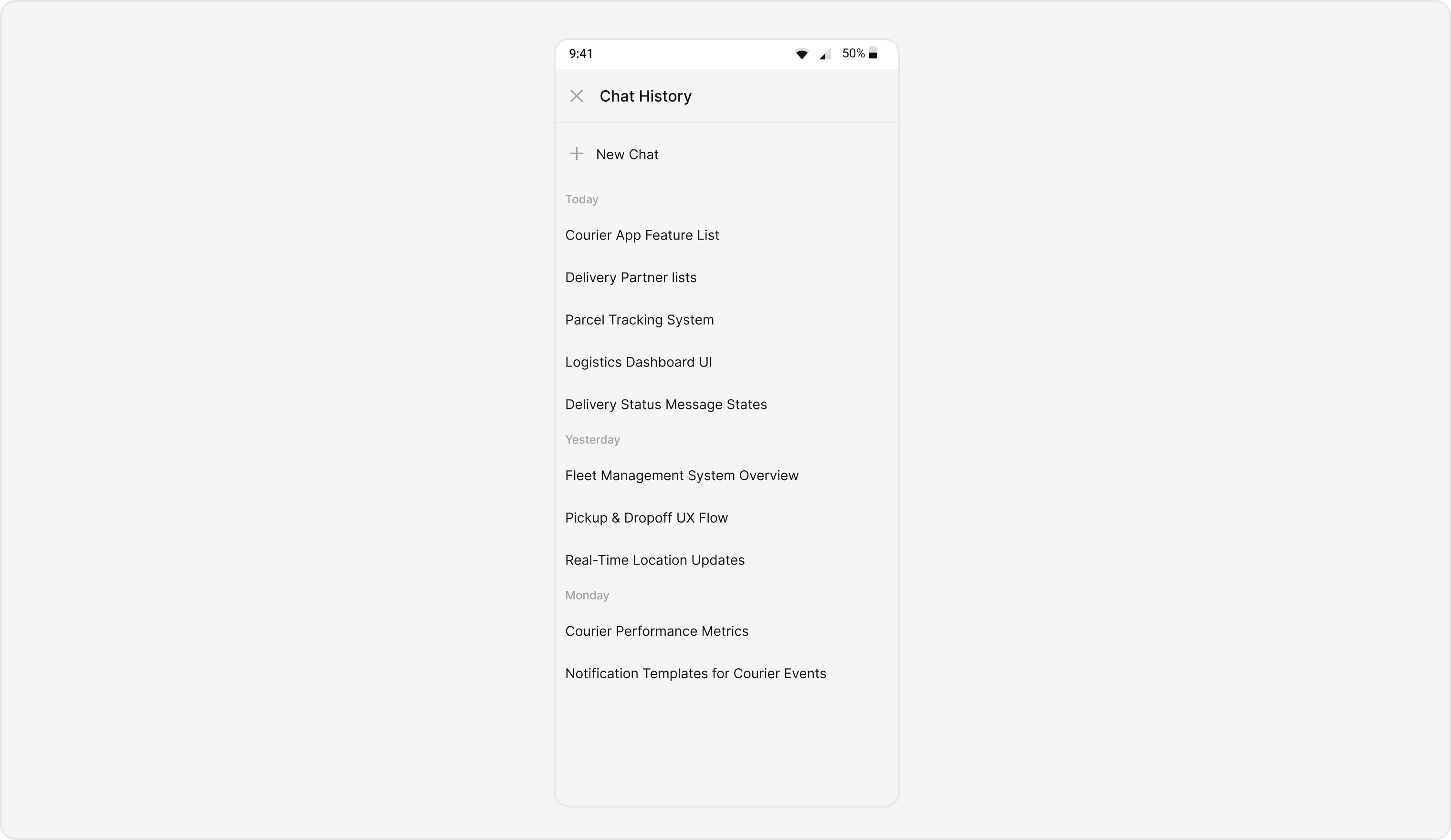
CometChatAIAssistanceChatHistory displays past conversations between users and AI assistants. Users can review previous AI interactions and start new conversations.
Prerequisites
Install CometChat UI Kit
Add to your Podfile:Run
Report incorrect code
Copy
Ask AI
pod 'CometChatUIKitSwift', '5.1.7'
pod installEnable AI Features
Go to CometChat Dashboard → AI → Enable AI features
Initialize CometChat
Report incorrect code
Copy
Ask AI
import CometChatUIKitSwift

let uikitSettings = UIKitSettings()
    .set(appID: "YOUR_APP_ID")
    .set(authKey: "YOUR_AUTH_KEY")
    .set(region: "YOUR_REGION")
    .build()

CometChatUIKit.init(uiKitSettings: uikitSettings) { result in
    switch result {
    case .success:
        CometChatUIKit.login(uid: "USER_ID") { _ in }
    case .failure(let error):
        print(error.localizedDescription)
    }
}
Basic Implementation
- Swift
Report incorrect code
Copy
Ask AI
import UIKit
import CometChatUIKitSwift
import CometChatSDK

class ViewController: UIViewController {

    var user: CometChat.User!

    func showAIChatHistory() {
        let chatHistory = CometChatAIAssistanceChatHistory()
        chatHistory.user = user  // Required!

        navigationController?.pushViewController(chatHistory, animated: true)
    }
}
You must set either
user or group. Without this, only a loading indicator will display.Production-Ready Implementation
Complete implementation with all features:- Swift
Report incorrect code
Copy
Ask AI
import UIKit
import CometChatUIKitSwift
import CometChatSDK

class AIAssistantViewController: UIViewController {

    // MARK: - Properties
    private var user: CometChat.User!
    private var chatHistoryComponent: CometChatAIAssistanceChatHistory!

    // MARK: - Initialization
    convenience init(user: CometChat.User) {
        self.init()
        self.user = user
    }

    // MARK: - Lifecycle
    override func viewDidLoad() {
        super.viewDidLoad()
        setupChatHistory()
    }

    // MARK: - Setup
    private func setupChatHistory() {
        chatHistoryComponent = CometChatAIAssistanceChatHistory()
        chatHistoryComponent.user = user

        // Configure callbacks
        setupCallbacks()

        // Configure styling
        setupStyling()

        // Configure date formatting
        setupDateFormatting()

        // Configure empty/error states
        setupStateViews()

        // Present
        navigationController?.pushViewController(chatHistoryComponent, animated: true)
    }

    // MARK: - Callbacks
    private func setupCallbacks() {
        // New chat button tapped
        chatHistoryComponent.onNewChatButtonClicked = { [weak self] in
            self?.startNewAIChat()
        }

        // Message tapped
        chatHistoryComponent.onMessageClicked = { [weak self] message in
            self?.handleMessageTap(message)
        }

        // Data loaded successfully
        chatHistoryComponent.set(onLoad: { messages in
            print("✅ Loaded \(messages.count) AI messages")
        })

        // No data available
        chatHistoryComponent.set(onEmpty: { [weak self] in
            print("📭 No AI chat history")
        })

        // Error occurred
        chatHistoryComponent.set(onError: { [weak self] error in
            self?.showError(error.localizedDescription)
        })
    }

    // MARK: - Styling
    private func setupStyling() {
        let style = AiAssistantChatHistoryStyle()

        // Background
        style.backgroundColor = .systemBackground

        // Item text
        style.itemTextFont = UIFont.systemFont(ofSize: 16, weight: .medium)
        style.itemTextColor = .label

        // New chat button
        style.newChatTitleFont = UIFont.systemFont(ofSize: 18, weight: .bold)
        style.newChatTitleColor = .systemBlue

        chatHistoryComponent.style = style
    }

    // MARK: - Date Formatting
    private func setupDateFormatting() {
        // Today's messages
        chatHistoryComponent.dateTimeFormatter.today = { timestamp in
            let date = Date(timeIntervalSince1970: TimeInterval(timestamp))
            let formatter = DateFormatter()
            formatter.timeStyle = .short
            return "Today at \(formatter.string(from: date))"
        }

        // Yesterday's messages
        chatHistoryComponent.dateTimeFormatter.yesterday = { timestamp in
            let date = Date(timeIntervalSince1970: TimeInterval(timestamp))
            let formatter = DateFormatter()
            formatter.timeStyle = .short
            return "Yesterday at \(formatter.string(from: date))"
        }

        // Older messages
        chatHistoryComponent.dateTimeFormatter.otherDay = { timestamp in
            let date = Date(timeIntervalSince1970: TimeInterval(timestamp))
            let formatter = DateFormatter()
            formatter.dateFormat = "MMM d, yyyy 'at' h:mm a"
            return formatter.string(from: date)
        }
    }

    // MARK: - State Views
    private func setupStateViews() {
        // Empty state text
        chatHistoryComponent.emptyStateText = "No AI conversations yet"
        chatHistoryComponent.emptyStateSubtitleText = "Tap 'New Chat' to start talking with AI"

        // Error state text
        chatHistoryComponent.errorStateText = "Couldn't load history"
        chatHistoryComponent.errorStateSubtitleText = "Please check your connection and try again"
    }

    // MARK: - Actions
    private func startNewAIChat() {
        // Option 1: Open messages view for new AI chat
        let messagesVC = CometChatMessages()
        messagesVC.user = user
        navigationController?.pushViewController(messagesVC, animated: true)

        // Option 2: Show action sheet with options
        // showNewChatOptions()
    }

    private func handleMessageTap(_ message: BaseMessage) {
        print("Tapped message ID: \(message.id)")
        print("Message text: \(message.text ?? "No text")")

        // Show message details or continue conversation
        let alert = UIAlertController(
            title: "Message",
            message: message.text,
            preferredStyle: .alert
        )
        alert.addAction(UIAlertAction(title: "Continue Chat", style: .default) { [weak self] _ in
            self?.continueChat(from: message)
        })
        alert.addAction(UIAlertAction(title: "Close", style: .cancel))
        present(alert, animated: true)
    }

    private func continueChat(from message: BaseMessage) {
        let messagesVC = CometChatMessages()
        messagesVC.user = user
        navigationController?.pushViewController(messagesVC, animated: true)
    }

    private func showError(_ message: String) {
        let alert = UIAlertController(
            title: "Error",
            message: message,
            preferredStyle: .alert
        )
        alert.addAction(UIAlertAction(title: "Retry", style: .default) { [weak self] _ in
            self?.setupChatHistory()
        })
        alert.addAction(UIAlertAction(title: "Cancel", style: .cancel))
        present(alert, animated: true)
    }
}
Custom Views
Custom Loading View
- Swift
Report incorrect code
Copy
Ask AI
let chatHistory = CometChatAIAssistanceChatHistory()
chatHistory.user = user

// Custom loading indicator
let loadingView = UIActivityIndicatorView(style: .large)
loadingView.color = .systemBlue
loadingView.startAnimating()

chatHistory.set(loadingView: loadingView)
Custom Empty State View
- Swift
Report incorrect code
Copy
Ask AI
import UIKit
import CometChatUIKitSwift

class CustomEmptyView: UIView {

    private let imageView: UIImageView = {
        let iv = UIImageView()
        iv.image = UIImage(systemName: "sparkles")
        iv.tintColor = .systemBlue
        iv.contentMode = .scaleAspectFit
        iv.translatesAutoresizingMaskIntoConstraints = false
        return iv
    }()

    private let titleLabel: UILabel = {
        let label = UILabel()
        label.text = "No AI Conversations"
        label.font = .systemFont(ofSize: 20, weight: .bold)
        label.textAlignment = .center
        label.translatesAutoresizingMaskIntoConstraints = false
        return label
    }()

    private let subtitleLabel: UILabel = {
        let label = UILabel()
        label.text = "Start a conversation with AI to see it here"
        label.font = .systemFont(ofSize: 16)
        label.textColor = .secondaryLabel
        label.textAlignment = .center
        label.numberOfLines = 0
        label.translatesAutoresizingMaskIntoConstraints = false
        return label
    }()

    let startChatButton: UIButton = {
        let button = UIButton(type: .system)
        button.setTitle("Start New Chat", for: .normal)
        button.titleLabel?.font = .systemFont(ofSize: 16, weight: .semibold)
        button.backgroundColor = .systemBlue
        button.setTitleColor(.white, for: .normal)
        button.layer.cornerRadius = 12
        button.translatesAutoresizingMaskIntoConstraints = false
        return button
    }()

    override init(frame: CGRect) {
        super.init(frame: frame)
        setupUI()
    }

    required init?(coder: NSCoder) {
        fatalError("init(coder:) has not been implemented")
    }

    private func setupUI() {
        addSubview(imageView)
        addSubview(titleLabel)
        addSubview(subtitleLabel)
        addSubview(startChatButton)

        NSLayoutConstraint.activate([
            imageView.centerXAnchor.constraint(equalTo: centerXAnchor),
            imageView.centerYAnchor.constraint(equalTo: centerYAnchor, constant: -80),
            imageView.widthAnchor.constraint(equalToConstant: 80),
            imageView.heightAnchor.constraint(equalToConstant: 80),

            titleLabel.topAnchor.constraint(equalTo: imageView.bottomAnchor, constant: 24),
            titleLabel.leadingAnchor.constraint(equalTo: leadingAnchor, constant: 32),
            titleLabel.trailingAnchor.constraint(equalTo: trailingAnchor, constant: -32),

            subtitleLabel.topAnchor.constraint(equalTo: titleLabel.bottomAnchor, constant: 8),
            subtitleLabel.leadingAnchor.constraint(equalTo: leadingAnchor, constant: 32),
            subtitleLabel.trailingAnchor.constraint(equalTo: trailingAnchor, constant: -32),

            startChatButton.topAnchor.constraint(equalTo: subtitleLabel.bottomAnchor, constant: 24),
            startChatButton.centerXAnchor.constraint(equalTo: centerXAnchor),
            startChatButton.widthAnchor.constraint(equalToConstant: 180),
            startChatButton.heightAnchor.constraint(equalToConstant: 48)
        ])
    }
}

// Usage
let chatHistory = CometChatAIAssistanceChatHistory()
chatHistory.user = user

let emptyView = CustomEmptyView()
emptyView.startChatButton.addTarget(self, action: #selector(startNewChat), for: .touchUpInside)

chatHistory.set(emptyView: emptyView)
Custom Error State View
- Swift
Report incorrect code
Copy
Ask AI
import UIKit
import CometChatUIKitSwift

class CustomErrorView: UIView {

    private let iconView: UIImageView = {
        let iv = UIImageView()
        iv.image = UIImage(systemName: "exclamationmark.triangle")
        iv.tintColor = .systemRed
        iv.contentMode = .scaleAspectFit
        iv.translatesAutoresizingMaskIntoConstraints = false
        return iv
    }()

    private let titleLabel: UILabel = {
        let label = UILabel()
        label.text = "Something went wrong"
        label.font = .systemFont(ofSize: 18, weight: .semibold)
        label.textAlignment = .center
        label.translatesAutoresizingMaskIntoConstraints = false
        return label
    }()

    private let messageLabel: UILabel = {
        let label = UILabel()
        label.text = "We couldn't load your AI chat history.\nPlease check your connection."
        label.font = .systemFont(ofSize: 14)
        label.textColor = .secondaryLabel
        label.textAlignment = .center
        label.numberOfLines = 0
        label.translatesAutoresizingMaskIntoConstraints = false
        return label
    }()

    let retryButton: UIButton = {
        let button = UIButton(type: .system)
        button.setTitle("Try Again", for: .normal)
        button.titleLabel?.font = .systemFont(ofSize: 16, weight: .medium)
        button.backgroundColor = .systemBlue
        button.setTitleColor(.white, for: .normal)
        button.layer.cornerRadius = 10
        button.translatesAutoresizingMaskIntoConstraints = false
        return button
    }()

    override init(frame: CGRect) {
        super.init(frame: frame)
        setupUI()
    }

    required init?(coder: NSCoder) {
        fatalError("init(coder:) has not been implemented")
    }

    private func setupUI() {
        addSubview(iconView)
        addSubview(titleLabel)
        addSubview(messageLabel)
        addSubview(retryButton)

        NSLayoutConstraint.activate([
            iconView.centerXAnchor.constraint(equalTo: centerXAnchor),
            iconView.centerYAnchor.constraint(equalTo: centerYAnchor, constant: -60),
            iconView.widthAnchor.constraint(equalToConstant: 60),
            iconView.heightAnchor.constraint(equalToConstant: 60),

            titleLabel.topAnchor.constraint(equalTo: iconView.bottomAnchor, constant: 16),
            titleLabel.leadingAnchor.constraint(equalTo: leadingAnchor, constant: 24),
            titleLabel.trailingAnchor.constraint(equalTo: trailingAnchor, constant: -24),

            messageLabel.topAnchor.constraint(equalTo: titleLabel.bottomAnchor, constant: 8),
            messageLabel.leadingAnchor.constraint(equalTo: leadingAnchor, constant: 24),
            messageLabel.trailingAnchor.constraint(equalTo: trailingAnchor, constant: -24),

            retryButton.topAnchor.constraint(equalTo: messageLabel.bottomAnchor, constant: 20),
            retryButton.centerXAnchor.constraint(equalTo: centerXAnchor),
            retryButton.widthAnchor.constraint(equalToConstant: 140),
            retryButton.heightAnchor.constraint(equalToConstant: 44)
        ])
    }
}

// Usage
let chatHistory = CometChatAIAssistanceChatHistory()
chatHistory.user = user

let errorView = CustomErrorView()
errorView.retryButton.addTarget(self, action: #selector(retryLoading), for: .touchUpInside)

chatHistory.set(errorView: errorView)
Filter Messages
Customize which messages are displayed:- Swift
Report incorrect code
Copy
Ask AI
import CometChatSDK
import CometChatUIKitSwift

let chatHistory = CometChatAIAssistanceChatHistory()
chatHistory.user = user

// Create custom message request builder
let builder = MessagesRequest.MessageRequestBuilder()
    .set(uid: user.uid ?? "")
    .set(limit: 50)

chatHistory.set(messagesRequestBuilder: builder)
These parameters are always overridden by the component:
uid/guidtypescategories
Embed in Your App
As a Tab
- Swift
Report incorrect code
Copy
Ask AI
import UIKit
import CometChatUIKitSwift
import CometChatSDK

class MainTabBarController: UITabBarController {

    var currentUser: CometChat.User!

    override func viewDidLoad() {
        super.viewDidLoad()
        fetchUserAndSetupTabs()
    }

    private func fetchUserAndSetupTabs() {
        // Get current logged in user
        guard let user = CometChat.getLoggedInUser() else { return }
        currentUser = user
        setupTabs()
    }

    private func setupTabs() {
        // Chats Tab
        let chatsVC = CometChatConversationsWithMessages()
        let chatsNav = UINavigationController(rootViewController: chatsVC)
        chatsNav.tabBarItem = UITabBarItem(
            title: "Chats",
            image: UIImage(systemName: "message"),
            selectedImage: UIImage(systemName: "message.fill")
        )

        // AI Assistant Tab
        let aiVC = CometChatAIAssistanceChatHistory()
        aiVC.user = currentUser
        aiVC.onNewChatButtonClicked = { [weak self] in
            self?.startNewAIChat()
        }
        let aiNav = UINavigationController(rootViewController: aiVC)
        aiNav.tabBarItem = UITabBarItem(
            title: "AI Assistant",
            image: UIImage(systemName: "sparkles"),
            selectedImage: UIImage(systemName: "sparkles")
        )

        // Users Tab
        let usersVC = CometChatUsersWithMessages()
        let usersNav = UINavigationController(rootViewController: usersVC)
        usersNav.tabBarItem = UITabBarItem(
            title: "Users",
            image: UIImage(systemName: "person.2"),
            selectedImage: UIImage(systemName: "person.2.fill")
        )

        viewControllers = [chatsNav, aiNav, usersNav]
    }

    private func startNewAIChat() {
        let messagesVC = CometChatMessages()
        messagesVC.user = currentUser

        if let nav = selectedViewController as? UINavigationController {
            nav.pushViewController(messagesVC, animated: true)
        }
    }
}
As a Button Action
- Swift
Report incorrect code
Copy
Ask AI
import UIKit
import CometChatUIKitSwift
import CometChatSDK

class ProfileViewController: UIViewController {

    var user: CometChat.User!

    private let aiHistoryButton: UIButton = {
        let button = UIButton(type: .system)
        button.setTitle("View AI Chat History", for: .normal)
        button.setImage(UIImage(systemName: "sparkles"), for: .normal)
        button.backgroundColor = .systemBlue
        button.tintColor = .white
        button.layer.cornerRadius = 12
        button.translatesAutoresizingMaskIntoConstraints = false
        return button
    }()

    override func viewDidLoad() {
        super.viewDidLoad()
        setupUI()
    }

    private func setupUI() {
        view.backgroundColor = .systemBackground
        view.addSubview(aiHistoryButton)

        NSLayoutConstraint.activate([
            aiHistoryButton.centerXAnchor.constraint(equalTo: view.centerXAnchor),
            aiHistoryButton.centerYAnchor.constraint(equalTo: view.centerYAnchor),
            aiHistoryButton.widthAnchor.constraint(equalToConstant: 250),
            aiHistoryButton.heightAnchor.constraint(equalToConstant: 50)
        ])

        aiHistoryButton.addTarget(self, action: #selector(showAIHistory), for: .touchUpInside)
    }

    @objc private func showAIHistory() {
        let chatHistory = CometChatAIAssistanceChatHistory()
        chatHistory.user = user

        chatHistory.onNewChatButtonClicked = { [weak self] in
            let messagesVC = CometChatMessages()
            messagesVC.user = self?.user
            self?.navigationController?.pushViewController(messagesVC, animated: true)
        }

        navigationController?.pushViewController(chatHistory, animated: true)
    }
}
API Reference
Properties
| Property | Type | Required | Description |
|---|---|---|---|
user | CometChat.User | Yes* | User for AI chat history |
group | CometChat.Group | Yes* | Group for AI chat history |
style | AiAssistantChatHistoryStyle | No | Custom styling |
emptyStateText | String | No | Empty state title |
emptyStateSubtitleText | String | No | Empty state subtitle |
errorStateText | String | No | Error state title |
errorStateSubtitleText | String | No | Error state subtitle |
hideDateSeparator | Bool | No | Hide date separators |
backButton | UIButton | No | Custom back button |
user or group is required
Callbacks
| Method | Parameters | Description |
|---|---|---|
onNewChatButtonClicked | () -> Void | New chat button tapped |
onMessageClicked | (BaseMessage) -> Void | Message tapped |
set(onLoad:) | ([BaseMessage]) -> Void | Data loaded |
set(onEmpty:) | () -> Void | No data |
set(onError:) | (Error) -> Void | Error occurred |
Custom Views
| Method | Parameters | Description |
|---|---|---|
set(loadingView:) | UIView | Custom loading view |
set(emptyView:) | UIView | Custom empty state |
set(errorView:) | UIView | Custom error state |
set(messagesRequestBuilder:) | MessagesRequestBuilder | Filter messages |
Style Properties (AiAssistantChatHistoryStyle)
| Property | Type | Description |
|---|---|---|
backgroundColor | UIColor | Background color |
itemTextFont | UIFont | Message text font |
itemTextColor | UIColor | Message text color |
newChatTitleFont | UIFont | New chat button font |
newChatTitleColor | UIColor | New chat button color |
Troubleshooting
| Problem | Solution |
|---|---|
| Only loading indicator shows | Set user or group property |
| No messages displayed | Enable AI features in CometChat Dashboard |
| Styling not applied | Apply style before presenting view |
| Callbacks not firing | Set callbacks before pushing to navigation |
| Empty state not showing | Check set(onEmpty:) callback |
Related
- AI Features Overview - All AI features
- Message List - Chat message display
- Message Composer - Message input
- Components Overview - All components