

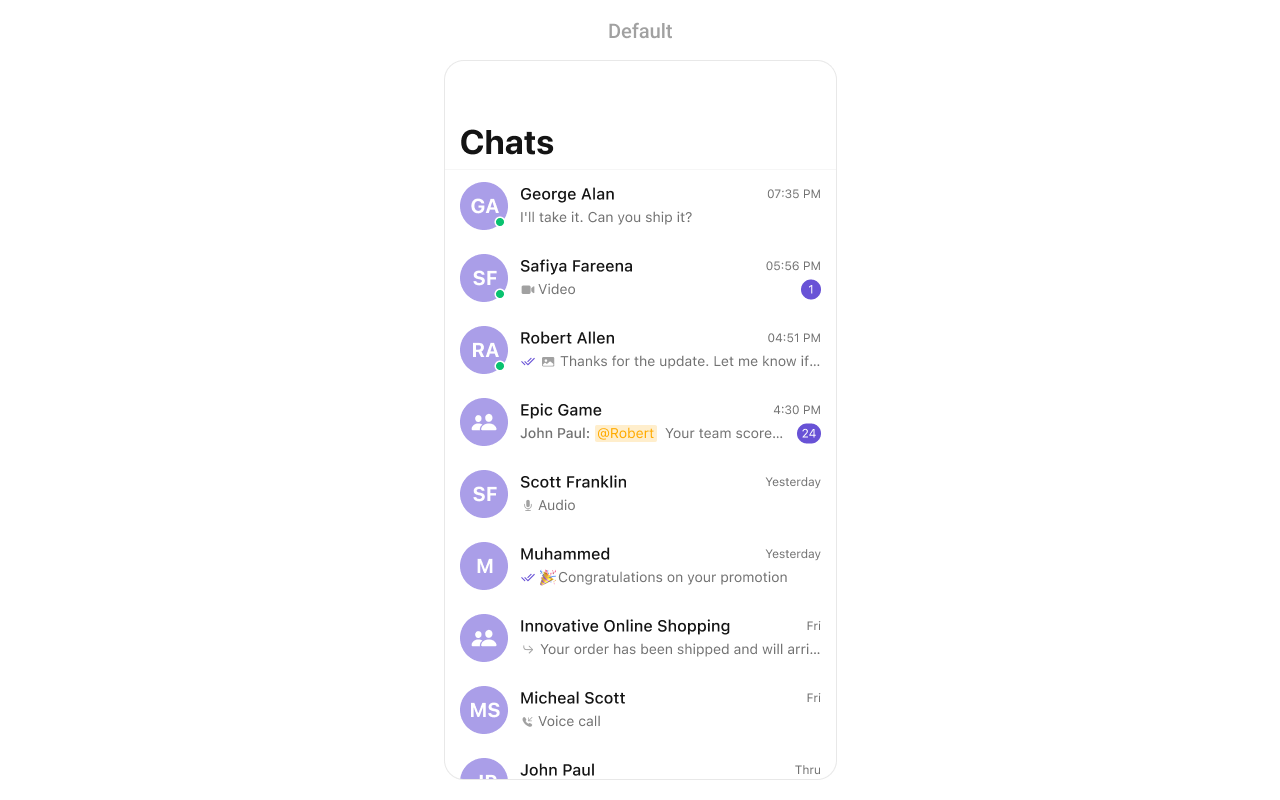
CometChatConversations component displays a list of all conversations (one-on-one and group chats) for the currently logged-in user. It shows the last message, unread count, typing indicators, and user presence in real-time.
Prerequisites
Before using this component, ensure you have:Basic Usage
Report incorrect code
Copy
Ask AI
import CometChatUIKitSwift

class ConversationsViewController: UIViewController {

    override func viewDidLoad() {
        super.viewDidLoad()

        let conversations = CometChatConversations()

        // Push to navigation stack
        navigationController?.pushViewController(conversations, animated: true)
    }
}
Production-Ready Implementation
This example shows a complete conversations screen with navigation to messages, custom filtering, and error handling:Report incorrect code
Copy
Ask AI
import UIKit
import CometChatUIKitSwift
import CometChatSDK

class ChatListViewController: UIViewController {

    private var conversationsController: CometChatConversations!

    override func viewDidLoad() {
        super.viewDidLoad()
        setupConversations()
    }

    private func setupConversations() {
        // Create custom request builder for filtering
        let requestBuilder = ConversationRequest.ConversationRequestBuilder(limit: 30)
            .set(conversationType: .both)  // Show both user and group conversations

        // Initialize conversations component
        conversationsController = CometChatConversations(conversationRequestBuilder: requestBuilder)

        // Handle conversation selection - navigate to messages
        conversationsController.set(onItemClick: { [weak self] conversation, indexPath in
            self?.openMessages(for: conversation)
        })

        // Handle long press for additional options
        conversationsController.set(onItemLongClick: { [weak self] conversation, indexPath in
            self?.showConversationOptions(for: conversation)
        })

        // Handle errors
        conversationsController.set(onError: { error in
            print("Conversations error: \(error.errorDescription)")
        })

        // Handle empty state
        conversationsController.set(onEmpty: {
            print("No conversations found")
        })

        // Handle when conversations are loaded
        conversationsController.set(onLoad: { conversations in
            print("Loaded \(conversations.count) conversations")
        })

        // Present the conversations
        navigationController?.pushViewController(conversationsController, animated: true)
    }

    private func openMessages(for conversation: Conversation) {
        if let user = conversation.conversationWith as? User {
            let messagesVC = CometChatMessages()
            messagesVC.set(user: user)
            navigationController?.pushViewController(messagesVC, animated: true)
        } else if let group = conversation.conversationWith as? Group {
            let messagesVC = CometChatMessages()
            messagesVC.set(group: group)
            navigationController?.pushViewController(messagesVC, animated: true)
        }
    }

    private func showConversationOptions(for conversation: Conversation) {
        let alert = UIAlertController(title: "Options", message: nil, preferredStyle: .actionSheet)

        alert.addAction(UIAlertAction(title: "Delete", style: .destructive) { _ in
            CometChat.deleteConversation(
                conversationWith: conversation.conversationWith?.uid ?? "",
                conversationType: conversation.conversationType
            ) { success in
                print("Conversation deleted")
            } onError: { error in
                print("Delete failed: \(error?.errorDescription ?? "")")
            }
        })

        alert.addAction(UIAlertAction(title: "Cancel", style: .cancel))
        present(alert, animated: true)
    }
}
Filter Conversations
UseConversationRequestBuilder to filter which conversations appear:
Report incorrect code
Copy
Ask AI
// Show only one-on-one conversations
let userOnlyBuilder = ConversationRequest.ConversationRequestBuilder(limit: 20)
    .set(conversationType: .user)

let conversations = CometChatConversations(conversationRequestBuilder: userOnlyBuilder)
Report incorrect code
Copy
Ask AI
// Show only group conversations
let groupOnlyBuilder = ConversationRequest.ConversationRequestBuilder(limit: 20)
    .set(conversationType: .group)

let conversations = CometChatConversations(conversationRequestBuilder: groupOnlyBuilder)
Report incorrect code
Copy
Ask AI
// Filter by tags
let taggedBuilder = ConversationRequest.ConversationRequestBuilder(limit: 20)
    .set(conversationType: .both)
    .withTags(true)
    .set(tags: ["support", "sales"])

let conversations = CometChatConversations(conversationRequestBuilder: taggedBuilder)
Actions Reference
| Method | Description | Example |
|---|---|---|
set(onItemClick:) | Triggered when a conversation is tapped | Navigate to messages |
set(onItemLongClick:) | Triggered on long press | Show options menu |
set(onBack:) | Triggered when back button is pressed | Custom navigation |
set(onSelection:) | Triggered in selection mode | Multi-select conversations |
set(onError:) | Triggered when an error occurs | Show error alert |
set(onEmpty:) | Triggered when list is empty | Show empty state |
set(onLoad:) | Triggered when conversations load | Analytics tracking |
Styling
Quick Styling
Report incorrect code
Copy
Ask AI
let conversations = CometChatConversations()

// Apply custom colors
CometChatConversation.style.backgroundColor = .systemBackground
CometChatConversation.style.lastMessageTextColor = .secondaryLabel
CometChatConversation.style.typingIndicatorColor = .systemGreen

// Custom avatar style
let avatarStyle = AvatarStyle()
avatarStyle.backgroundColor = UIColor(hex: "#6851D6")
avatarStyle.cornerRadius = 8
CometChatConversation.style.avatarStyle = avatarStyle

// Custom badge style for unread count
let badgeStyle = BadgeStyle()
badgeStyle.backgroundColor = UIColor(hex: "#F44649")
badgeStyle.cornerRadius = CometChatCornerStyle(cornerRadius: 10)
CometChatConversation.style.badgeStyle = badgeStyle
Style Properties
| Property | Description |
|---|---|
backgroundColor | Background color of the list |
lastMessageTextColor | Color of the last message preview |
typingIndicatorColor | Color of “typing…” indicator |
separatorColor | Color of row separators |
avatarStyle | Style for user/group avatars |
badgeStyle | Style for unread message count |
receiptStyle | Style for read/delivered receipts |
dateStyle | Style for timestamp labels |
Hide UI Elements
Report incorrect code
Copy
Ask AI
let conversations = CometChatConversations()

// Hide elements as needed
conversations.hideSearch = true              // Hide search bar
conversations.hideReceipts = true            // Hide read/delivered receipts
conversations.hideUserStatus = true          // Hide online/offline status
conversations.hideGroupType = true           // Hide public/private group icons
conversations.hideDeleteConversationOption = true  // Hide delete option
conversations.hideNavigationBar = true       // Hide navigation bar
conversations.hideBackButton = true          // Hide back button
Custom Views
Custom List Item
Replace the entire conversation row with your own design:Report incorrect code
Copy
Ask AI
conversations.set(listItemView: { conversation in
    let customView = CustomConversationCell()
    customView.configure(with: conversation)
    return customView
})
Report incorrect code
Copy
Ask AI
// CustomConversationCell.swift
class CustomConversationCell: UIView {

    private let avatarView = CometChatAvatar(image: UIImage())
    private let nameLabel = UILabel()
    private let messageLabel = UILabel()
    private let timeLabel = UILabel()
    private let unreadBadge = UILabel()

    override init(frame: CGRect) {
        super.init(frame: frame)
        setupUI()
    }

    required init?(coder: NSCoder) {
        fatalError("init(coder:) has not been implemented")
    }

    private func setupUI() {
        avatarView.translatesAutoresizingMaskIntoConstraints = false
        nameLabel.translatesAutoresizingMaskIntoConstraints = false
        messageLabel.translatesAutoresizingMaskIntoConstraints = false
        timeLabel.translatesAutoresizingMaskIntoConstraints = false
        unreadBadge.translatesAutoresizingMaskIntoConstraints = false

        nameLabel.font = .systemFont(ofSize: 16, weight: .semibold)
        messageLabel.font = .systemFont(ofSize: 14)
        messageLabel.textColor = .secondaryLabel
        timeLabel.font = .systemFont(ofSize: 12)
        timeLabel.textColor = .tertiaryLabel

        unreadBadge.font = .systemFont(ofSize: 12, weight: .bold)
        unreadBadge.textColor = .white
        unreadBadge.backgroundColor = .systemBlue
        unreadBadge.textAlignment = .center
        unreadBadge.layer.cornerRadius = 10
        unreadBadge.clipsToBounds = true

        addSubview(avatarView)
        addSubview(nameLabel)
        addSubview(messageLabel)
        addSubview(timeLabel)
        addSubview(unreadBadge)

        NSLayoutConstraint.activate([
            avatarView.leadingAnchor.constraint(equalTo: leadingAnchor, constant: 16),
            avatarView.centerYAnchor.constraint(equalTo: centerYAnchor),
            avatarView.widthAnchor.constraint(equalToConstant: 50),
            avatarView.heightAnchor.constraint(equalToConstant: 50),

            nameLabel.leadingAnchor.constraint(equalTo: avatarView.trailingAnchor, constant: 12),
            nameLabel.topAnchor.constraint(equalTo: avatarView.topAnchor, constant: 4),
            nameLabel.trailingAnchor.constraint(lessThanOrEqualTo: timeLabel.leadingAnchor, constant: -8),

            messageLabel.leadingAnchor.constraint(equalTo: nameLabel.leadingAnchor),
            messageLabel.topAnchor.constraint(equalTo: nameLabel.bottomAnchor, constant: 4),
            messageLabel.trailingAnchor.constraint(lessThanOrEqualTo: unreadBadge.leadingAnchor, constant: -8),

            timeLabel.trailingAnchor.constraint(equalTo: trailingAnchor, constant: -16),
            timeLabel.topAnchor.constraint(equalTo: nameLabel.topAnchor),

            unreadBadge.trailingAnchor.constraint(equalTo: trailingAnchor, constant: -16),
            unreadBadge.centerYAnchor.constraint(equalTo: messageLabel.centerYAnchor),
            unreadBadge.widthAnchor.constraint(greaterThanOrEqualToConstant: 20),
            unreadBadge.heightAnchor.constraint(equalToConstant: 20)
        ])
    }

    func configure(with conversation: Conversation) {
        var name = ""
        var avatarURL: String?

        if let user = conversation.conversationWith as? User {
            name = user.name ?? ""
            avatarURL = user.avatar
        } else if let group = conversation.conversationWith as? Group {
            name = group.name ?? ""
            avatarURL = group.icon
        }

        nameLabel.text = name
        avatarView.setAvatar(avatarUrl: avatarURL, with: name)

        // Set last message
        if let textMessage = conversation.lastMessage as? TextMessage {
            messageLabel.text = textMessage.text
        } else if conversation.lastMessage is MediaMessage {
            messageLabel.text = "📎 Attachment"
        } else {
            messageLabel.text = "No messages yet"
        }

        // Set time
        if let sentAt = conversation.lastMessage?.sentAt {
            let date = Date(timeIntervalSince1970: TimeInterval(sentAt))
            let formatter = DateFormatter()
            formatter.dateFormat = "h:mm a"
            timeLabel.text = formatter.string(from: date)
        }

        // Set unread count
        let unreadCount = conversation.unreadMessageCount
        unreadBadge.isHidden = unreadCount == 0
        unreadBadge.text = unreadCount > 99 ? "99+" : "\(unreadCount)"
    }
}
Custom Subtitle View
Customize just the subtitle area (below the name):Report incorrect code
Copy
Ask AI
conversations.set(subtitleView: { conversation in
    let label = UILabel()
    label.font = .systemFont(ofSize: 13)
    label.textColor = .secondaryLabel

    if let textMessage = conversation.lastMessage as? TextMessage {
        label.text = textMessage.text
    } else if conversation.lastMessage is MediaMessage {
        label.text = "📷 Photo"
    }

    return label
})
Custom Date Format
Report incorrect code
Copy
Ask AI
conversations.set(datePattern: { conversation in
    guard let sentAt = conversation.lastMessage?.sentAt else { return "" }

    let date = Date(timeIntervalSince1970: TimeInterval(sentAt))
    let formatter = DateFormatter()

    if Calendar.current.isDateInToday(date) {
        formatter.dateFormat = "h:mm a"
    } else if Calendar.current.isDateInYesterday(date) {
        return "Yesterday"
    } else {
        formatter.dateFormat = "MMM d"
    }

    return formatter.string(from: date)
})
Listen for Events
React to conversation changes in your app:Report incorrect code
Copy
Ask AI
class MyViewController: UIViewController, CometChatConversationEventListener {

    override func viewDidLoad() {
        super.viewDidLoad()
        CometChatConversationEvents.addListener("my-listener", self)
    }

    override func viewWillDisappear(_ animated: Bool) {
        super.viewWillDisappear(animated)
        CometChatConversationEvents.removeListener("my-listener")
    }

    // Called when a conversation is deleted
    func ccConversationDelete(conversation: Conversation) {
        print("Conversation deleted: \(conversation.conversationId ?? "")")
    }
}
Complete App Example
Here’s a full implementation with tab bar integration:Report incorrect code
Copy
Ask AI
import UIKit
import CometChatUIKitSwift
import CometChatSDK

class MainTabBarController: UITabBarController {

    override func viewDidLoad() {
        super.viewDidLoad()
        setupTabs()
    }

    private func setupTabs() {
        // Conversations Tab
        let conversationsVC = ConversationsContainerViewController()
        conversationsVC.tabBarItem = UITabBarItem(
            title: "Chats",
            image: UIImage(systemName: "message"),
            selectedImage: UIImage(systemName: "message.fill")
        )

        // Users Tab
        let usersVC = UINavigationController(rootViewController: CometChatUsers())
        usersVC.tabBarItem = UITabBarItem(
            title: "Users",
            image: UIImage(systemName: "person.2"),
            selectedImage: UIImage(systemName: "person.2.fill")
        )

        // Groups Tab
        let groupsVC = UINavigationController(rootViewController: CometChatGroups())
        groupsVC.tabBarItem = UITabBarItem(
            title: "Groups",
            image: UIImage(systemName: "person.3"),
            selectedImage: UIImage(systemName: "person.3.fill")
        )

        viewControllers = [conversationsVC, usersVC, groupsVC]
    }
}

class ConversationsContainerViewController: UINavigationController {

    override func viewDidLoad() {
        super.viewDidLoad()

        let conversations = CometChatConversations()

        // Navigate to messages on tap
        conversations.set(onItemClick: { [weak self] conversation, _ in
            let messagesVC = CometChatMessages()

            if let user = conversation.conversationWith as? User {
                messagesVC.set(user: user)
            } else if let group = conversation.conversationWith as? Group {
                messagesVC.set(group: group)
            }

            self?.pushViewController(messagesVC, animated: true)
        })

        setViewControllers([conversations], animated: false)
    }
}
Troubleshooting
| Issue | Solution |
|---|---|
| Empty conversation list | Ensure user is logged in and has existing conversations |
| Conversations not updating | Check that real-time listeners are active |
| Navigation not working | Verify navigationController is not nil |
| Custom views not appearing | Ensure custom view has proper constraints |
Related Components
- Messages - Display messages in a conversation
- Users - List all users to start new conversations
- Groups - List all groups
- Message Composer - Send messages